
Manual Shipping Confirmation
Please note that this shipping method should only be used to ship confirm an order if you have been explicitly instructed to do so by Mercury Commerce, Inc.
- Follow the instructions for "How do I look up an order?" to find the order that you need to ship confirm.
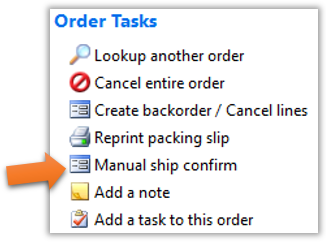
- Once you reach the Order Information page, you will notice a link list on the right side entitled “Order Tasks”. Click the “Manual ship confirm” link, as shown below.
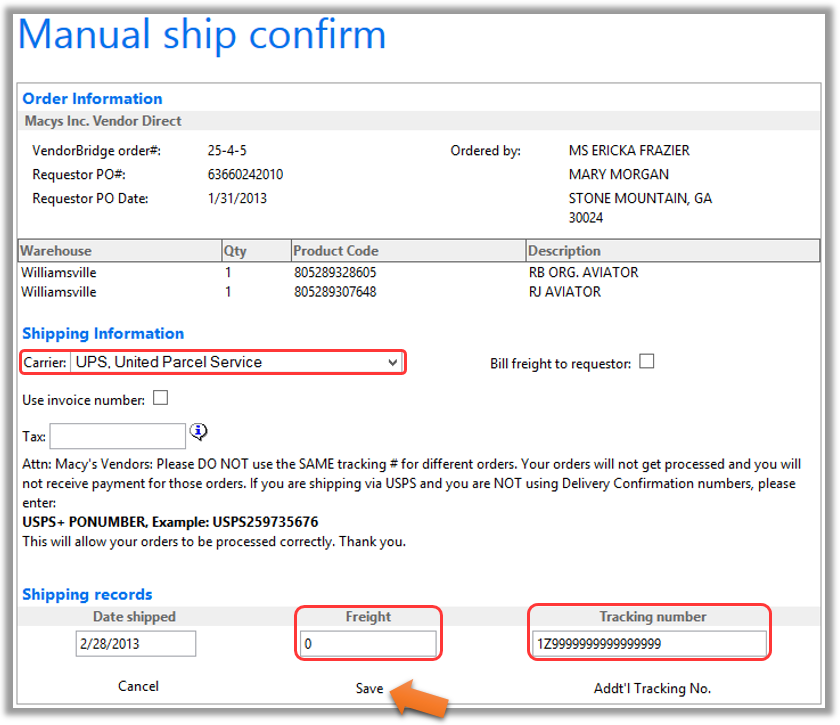
- On the manual ship confirm page, select the carrier, fill in “0.00” for the freight, and enter the tracking number without any spaces, as shown below. When all of the information is entered, click “Save” at the bottom of the page. You can now move on to the next order, if needed.
Still stuck?
Tell us what you tried and we will take it from there. We will know which article you were reading.