
In VendorBridge, our transfer orders feature allows vendors to isolate orders using different transfer attributes. Transfer orders offer many different attributes to choose from when a vendor needs to move an order such as, you can isolate all orders going to a specific state, by transit days, or by product code etc. and print just those orders.
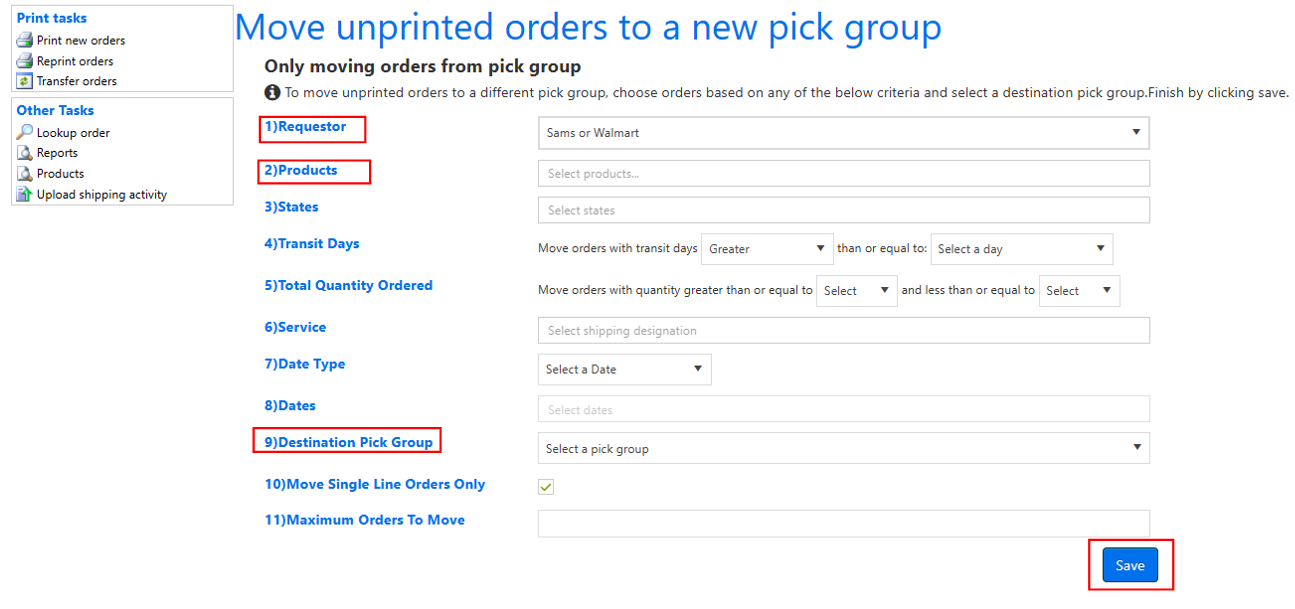
See below example on how to Transfer orders by product code.
Step 1.
Click “Transfer orders” on the Print New Order page.

Step 2.
- Select Requestor from the drop-down.
- Select the products you want to isolate in option 2.
- Select “temp” in option 9 (if you do not have a temporary pickgroup option please let us know).
- Click “Save”.
Still stuck?
Tell us what you tried and we will take it from there. We will know which article you were reading.