
Reprinting Orders
This is a simple process that can be done with only a few clicks. Go to the VendorBridge home page, then click on “Reprint orders” under the Printing Tasks header, as shown below:
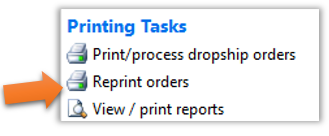
Any batches that were printed today will appear in a list on the next page. If you are looking for an older print batch, click on “Print Older Batches” on the top left to be taken to a calendar view with all of your print batches listed on the days they were originally printed. Click on any of the batch links to be taken to the Packing Slip Print Preview screen.
Still stuck?
Tell us what you tried and we will take it from there. We will know which article you were reading.