
A shipping label may not generate and report an error, due to either the customers shipping address or the selected service. When this happens, you will see an error in two places (See Picture Below)
- You will see the following error on the VendoBridge homepage.

- Clicking link will take you to a list order which had a shipping label error. When viewing the label error summary screen, click apply correction to begin reconciling each order's error.

- On the popup, apply a corrected address or service correction. You can use an address correction suggested by UPS which will show at the bottom of the popup. Click Save & Generate label to have UPS try to generate a corrected shipping label.
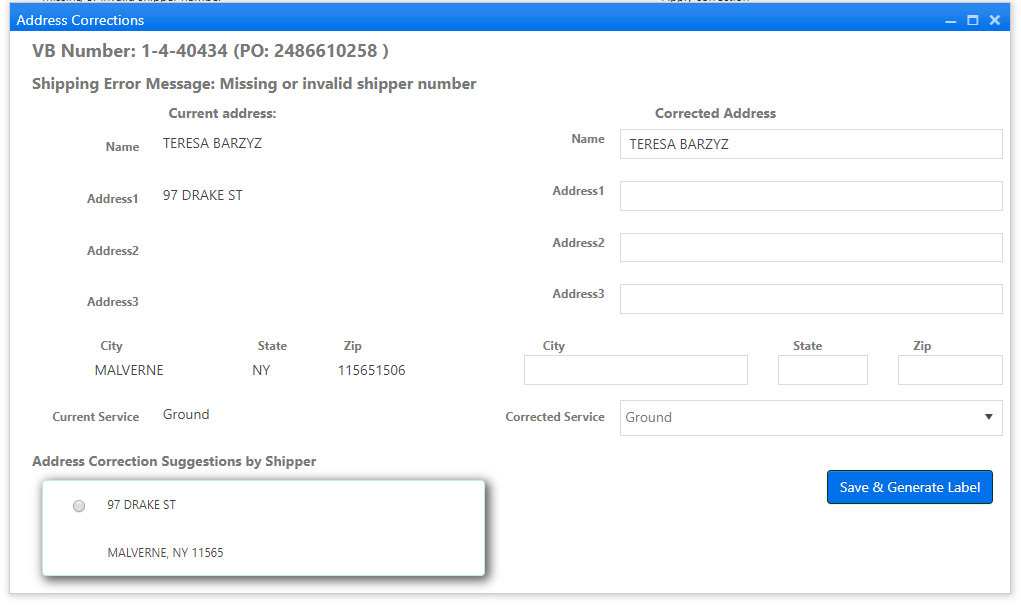
- After UPS generates a shipping label for the order, a new tab will open containing the packing slip with the shipping label which can be printed. If a new tab is not opened due to a popup blocker, you can navigate directly to the order in VendorBridge, and click the reprint packing slip option to pull down the packing slip with the shipping label.
Still stuck?
Tell us what you tried and we will take it from there. We will know which article you were reading.