
On this page
Editing Product Information
Spread Sheet Edit
To edit products via a spreadsheet, simply follow the same instructions as the "How do I upload product information?" guide for the Batch Upload procedure.
Manual Edit
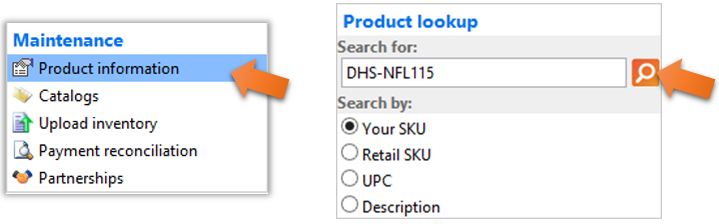
To manually edit a product, click on the “Product information” link from the VendorBridge Home page, as shown below. Use the “Product lookup” panel on the left to search for an item. Select the criteria you would like use for the lookup by selecting an option from the “Search by:” section, then type in your information in the “Search For:” box and click the orange magnifying glass icon, as shown below. If the product exists, you will see it on the list to the right. You can click on the line item to go into the “Editing product” screen. Navigate through the various tabs to update your information as needed.
Still stuck?
Tell us what you tried and we will take it from there. We will know which article you were reading.