
Hiding Extensions for Known File Types
In order to avoid corrupting order files during download, it is important that you disable the “Hide extensions for known file types” preference in your Folder Options. Please follow these instructions to do so:
Navigate to the Control Panel on your computer.
If you are using Windows XP or older, please skip to Step 3. If you are using Windows Vista or newer, click “Appearance and Personalization” from the Control Panel window, as shown below.
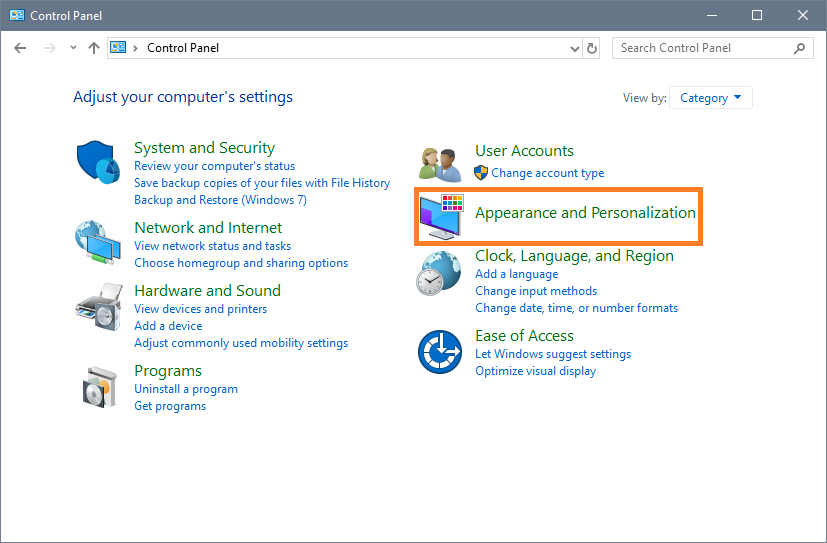
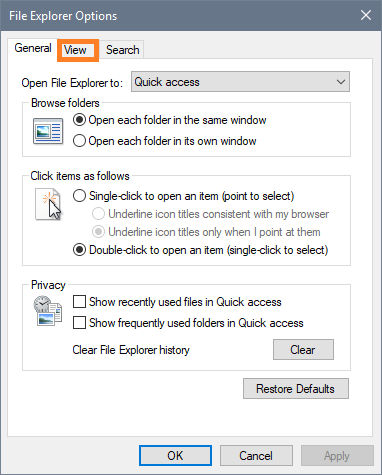
- Select “Folder Options” or "File Explorer Options" from the list and a new window will appear. Click the “View” tab as shown below:
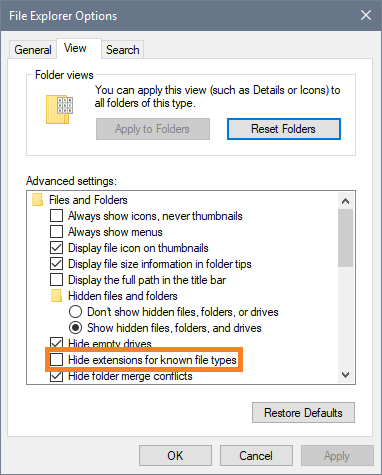
- Next, verify that the “Hide extensions for known file types” box is unchecked, as shown below. If it is checked, click the box to uncheck it. Click Ok to save the change.
You are now ready to begin printing your packing slips and downloading order files.
Still stuck?
Tell us what you tried and we will take it from there. We will know which article you were reading.